ONLYOFFICE 연동 4편: SDK, MinIO, Saga
목차
TL;DR by 🤖
3편까지는 "돌아가는 데모" 였다.
4편에서는 "확장 가능한 구조" 로 리팩토링한다.
Before → After:
| 항목 | 3편 (PoC) | 4편 (구조 개선) |
|---|---|---|
| Config 생성 | Map<String, Object> 하드코딩 |
SDK Default*Manager 상속 |
| 파일 저장 | 로컬 파일시스템 | MinIO (S3 호환) |
| 업로드 실패 | DB만 저장되고 파일 없음 💥 | PENDING → ACTIVE or cleanup |
| 콜백 동시성 | race condition 가능 | CAS 상태 머신 + 문서별 큐 |
| 파일 다운로드 | InputStreamResource (누수 위험) |
StreamingResponseBody + try-with-resources |
핵심 구현:
1. SDK Manager 상속 — DefaultDocumentManager, DefaultUrlManager 를 확장해 type-safe한 Config 생성
2. MinIO + @Retryable — S3 호환 Object Storage, 네트워크 장애 자동 재시도
3. Saga 패턴 — DB First 전략 + 실패 시 보상 트랜잭션으로 정합성 보장
4. Sealed Interface + CAS — Lock-free 상태 머신으로 콜백 race condition 방지
5. StreamingResponseBody — 일반적인 시나리오에서 MinIO 스트림 닫힘 보장
4편에서는...
3편에서는 Document.key 스펙 과 SAVE/FORCESAVE 콜백 처리 를 다뤘지만, 여전히 PoC 수준을 벗어나지 못했다.
3편의 한계
- ONLYOFFICE Config 관리 및 JWT 토큰 생성 등 관련 로직 하드코딩 → SDK 기능 미활용
- 로컬 파일시스템 의존
- 파일 업로드 실패 시 DB와 정합성 보장 미흡
4편에서 해결할 것
- ONLYOFFICE JAVA SDK 사용: SDK 분석 및 기존 코드 대체
- MinIO 적용: S3 호환 Object Storage로 파일 관리
- Saga 패턴: 업로드/삭제 시 DB + Storage 정합성 보장
- 동시성 제어: 문서별 콜백 큐로 race condition 방지
⚠️ 알림: Spring, Hibernate 7 관련 고도화는 6편 에 진행 예정.
ONLYOFFICE Java SDK 이해하기
SDK를 왜 써야 할까?
📚 공식 문서: ONLYOFFICE Java SDK GitHub | API 문서
3편까지는 ONLYOFFICE Config를 이런 식으로 만들었다.
// 3편 방식: Map 직접 조립
Map<String, Object> document = Map.of(
                "title", doc.getFileName(),
                "url", baseUrl + "/files/" + fileKey,
                "key", editorKey  // fileKey_v{version}
        );
Map<String, Object> config = Map.of(
                "document", document,
                "editorConfig", editorConfig
        );
문제점
1. 타입 안전성 없음: "documnet" 오타? url 필드 누락? 컴파일은 통과하고 런타임에 실패
2. 바퀴의 재발명: 파일 타입 감지(docx → word), JWT 서명, Config 구조 등 SDK가 이미 제공하는 기능을 직접 구현
3. 스펙 변경 취약: ONLYOFFICE API 버전업 시 모든 Map 리터럴을 찾아 수동 수정
💡 핵심: SDK가 제공하는 인터페이스 또는 기본 구현 클래스들을 활용해
우리 프로젝트에 맞게 커스터마이징하자.
SDK Manager 구조
ONLYOFFICE Java SDK 는 여러 Manager 인터페이스 와 Default 구현체 를 제공한다.
| Manager | 타입 | 역할 | 주요 메서드 |
|---|---|---|---|
SettingsManager |
Abstract | Document Server URL, JWT Secret 등 설정 | getSetting(), setSetting(), isSecurityEnabled() |
DocumentManager |
Abstract | document.key 생성, 파일 타입/포맷 감지 | getDocumentKey(), getDocumentName(), getFormats() |
UrlManager |
Concrete | 파일/콜백/GoBack URL 생성 | getFileUrl(), getCallbackUrl(), getInnerDocumentServerUrl() |
JwtManager |
Concrete | JWT 토큰 생성/검증 | createToken(), verify() |
DocumentServerClient |
Concrete | Document Server API 통신 | healthcheck(), convert(), command() |
💡 Abstract vs Concrete:
Abstract Manager(SettingsManager,DocumentManager)는
반드시 상속해서 구현해야 한다.
Concrete Manager는Default*구현체를 그대로 사용하거나
선택적으로 오버라이드할 수 있다.여기서는
Default*Manager를 상속해 필요한 메서드만 오버라이드.
SDK의 기본 기능(포맷 DB, 타입 감지 등)은 그대로 활용한다.
Part 1: SDK Manager 구현
CustomSettingsManager.java
@Component
public class CustomSettingsManager extends DefaultSettingsManager {

    @Value("${onlyoffice.url}")
    private String documentServerUrl;

    @Value("${onlyoffice.secret}")
    private String jwtSecret;

    private final Map<String, String> settings = new HashMap<>();

    @PostConstruct
    public void init() {
        // SDK 상수를 사용해 설정 저장
        setSetting(SettingsConstants.URL, documentServerUrl);
        setSetting(SettingsConstants.INNER_URL, documentServerUrl);
        setSetting(SettingsConstants.SECURITY_KEY, jwtSecret);  // ⭐ JWT Secret
        setSetting(SettingsConstants.SECURITY_HEADER, getSecurityHeader());
        setSetting(SettingsConstants.SECURITY_PREFIX, getSecurityPrefix());
    }

    @Override
    public String getSetting(String name) {
        return settings.get(name);
    }

    @Override
    public void setSetting(String name, String value) {
        settings.put(name, value);
    }

    // \`isSecurityEnabled()\`, \`getSecurityKey()\` 같은 메서드들은 기본 구현체 그대로 사용.
}
💡 참고:
SettingsConstants.URLvsSettingsConstants.INNER_URL
전자는 브라우저 또는 외부 서비스가,
후자는 이 백엔드가 Document Server API를 호출할 때 사용하는 URL을 뜻한다.
우리 프로젝트에서는host.docker.internal이 양방향(브라우저↔백엔드↔Document Server) 모두 접근 가능해서 같은 값 사용.
CustomDocumentManager.java
@Component
public class CustomDocumentManager extends DefaultDocumentManager {

    private final DocumentRepository documentRepository;

    public CustomDocumentManager(SettingsManager settingsManager,
                                 DocumentRepository documentRepository) {
        super(settingsManager);
        this.documentRepository = documentRepository;
    }

    @Override
    public String getDocumentKey(String fileId, boolean embedded) {
        // SDK 인터페이스는 fileId 파라미터명을 사용, 우리 프로젝트에서는 fileKey(UUID)를 전달
        // DB에서 조회 후 fileKey_v{version} 형태로 반환
        return documentRepository.findByFileKey(fileId)
                .map(doc -> KeyUtils.generateEditorKey(
                        doc.getFileKey(),
                        doc.getEditorVersion()))  // ⭐ fileKey_v{version}
                .orElseThrow(() -> new DocumentNotFoundException("fileKey: " + fileId));
    }

    @Override
    public String getDocumentName(String fileId) {
        // 원본 파일명 반환 (사용자에게 표시용)
        return documentRepository.findByFileKey(fileId)
                .map(Document::getFileName)
                .orElseThrow(() -> new DocumentNotFoundException("fileKey: " + fileId));
    }
}
상속의 이점:
getDocumentType(): 파일 확장자로word/cell/slide등 DocumentType 자동 감지지금보니
.vsdx등을 지원하는diagram타입이 추가된것같다. 이렇게 버전이 올라가 스펙이 바뀌어도 별다른 추가작업없이 바로 적용할 수 있는 것이 SDK를 사용하는 이유getExtension(),getBaseName()등 ONLYOFFICE에서 미리 구현해놓은 메소드들
등등, 여러 기능을 직접 구현하지 않고 SDK에서 제공받는다.
CustomUrlManager.java
@Component
public class CustomUrlManager extends DefaultUrlManager {

    @Value("${server.baseUrl}")
    private String serverBaseUrl;

    public CustomUrlManager(SettingsManager settingsManager) {
        super(settingsManager);
    }

    @Override
    public String getFileUrl(String fileId) {
        return UriComponentsBuilder.fromUriString(serverBaseUrl)
                .path("/files/{fileKey}")
                .buildAndExpand(fileId)
                .encode()
                .toUriString();  // ⭐ http://host.docker.internal:8080/files/{fileKey}
    }

    @Override
    public String getCallbackUrl(String fileId) {
        return UriComponentsBuilder.fromUriString(serverBaseUrl)
                .path("/callback")
                .queryParam("fileKey", fileId)  // ⭐ ?fileKey={uuid}
                .encode()
                .toUriString();
    }

}
⚠️ Docker 환경이라면!:
serverBaseUrl은 Docker 환경에서는
http://host.docker.internal:8080형식이어야 한다.
Document Server가 컨테이너 내부에서 이 URL로 접근하기 때문.
💡 참고: SDK의
DefaultUrlManager는getDocumentServerUrl()과getInnerDocumentServerUrl()메서드도 제공한다.
우리 프로젝트에서는 별도 오버라이드 없이SettingsManager에서 지정한 값을 그대로 사용한다.
SDK Bean 구성
@Configuration
public class OnlyOfficeConfig {

    @Bean
    public JwtManager jwtManager(CustomSettingsManager settingsManager) {
        return new DefaultJwtManager(settingsManager);  // ⭐ 기본 구현체 사용
    }

    // SettingsManager, DocumentManager, UrlManager는
    // @Component로 등록
}
💡
OnlyOfficeConfig에서JwtManager만 추가적으로 Bean으로 등록하고,
나머지 Manager들은@Component로 등록되게 했는데,
대신, 명시적으로 이 파일에서 직접@Bean으로 한꺼번에 등록해도 좋다.
Part 2: MinIO Object Storage 연동
왜 MinIO인가?
📚 공식 문서: MinIO Java Client
지금까지 로컬 파일시스템을 이용했는데 드디어 벗어난다. Object Storage로 가장 많이 쓰는건 AWS S3겠지만, 여긴 로컬 장난감용 프로젝트니 MinIO 로 대체하자.
MinIO 는 S3 호환 API 를 제공하는 오픈소스 Object Storage다.
AWS S3와 동일한 API로 개발하고, 프로덕션에서 AWS S3로 전환 가능하다. (일부 설정 및 미지원 API 조정 필요)
docker-compose.yml
services:
  minio:
    image: minio/minio:latest
    container_name: onlyoffice-minio
    ports:
      - "9000:9000"   # API
      - "9001:9001"   # Console
    environment:
      - MINIO_ROOT_USER=${MINIO_ROOT_USER}
      - MINIO_ROOT_PASSWORD=${MINIO_ROOT_PASSWORD}
    command: server /data --console-address ":9001"
    volumes:
      - ./minio_data:/data

  # postgres, onlyoffice-docs 설정은 생략...
⚠️ 확인:
http://localhost:9001로 접속 시 MinIO Console 화면이 뜨고,ROOT_USER,ROOT_PASSWORD로 로그인 잘 되는지 확인
MinioStorageService.java
간단하게 단일 버킷으로 시작하자. 물론 실제 서비스라면 여기도 꽤 많은 고민이 들어가야 하지만..
@Service
@RequiredArgsConstructor
public class MinioStorageService {

    private final MinioClient minioClient;

    @Value("${minio.bucket}")
    private String bucket;

    @PostConstruct
    public void init() {
        // ⚠️ 버킷이 없으면 자동 생성
        if (!minioClient.bucketExists(BucketExistsArgs.builder().bucket(bucket).build())) {
            minioClient.makeBucket(MakeBucketArgs.builder().bucket(bucket).build());
        }
    }

    // ⭐ @Retryable: 네트워크 장애 시 자동 재시도 (3회, 1초 간격)
    // 참고: MinIO의 objectName = 애플리케이션의 storagePath (예: documents/{fileKey}/{fileName})
    @Retryable(retryFor = Exception.class, maxAttempts = 3, backoff = @Backoff(delay = 1000))
    public void uploadStream(InputStream inputStream, long size, String contentType, String objectName) {
        minioClient.putObject(PutObjectArgs.builder()
                .bucket(bucket).object(objectName)
                .stream(inputStream, size, -1).contentType(contentType)
                .build());
    }

    public InputStream downloadFile(String objectName) {
        return minioClient.getObject(GetObjectArgs.builder()
                .bucket(bucket).object(objectName).build());
    }

    // deleteFile()도 @Retryable 적용 (패턴 동일)
}
💡 참고:
@Retryable사용 시spring-retry의존성과@EnableRetry설정이 필요하다.
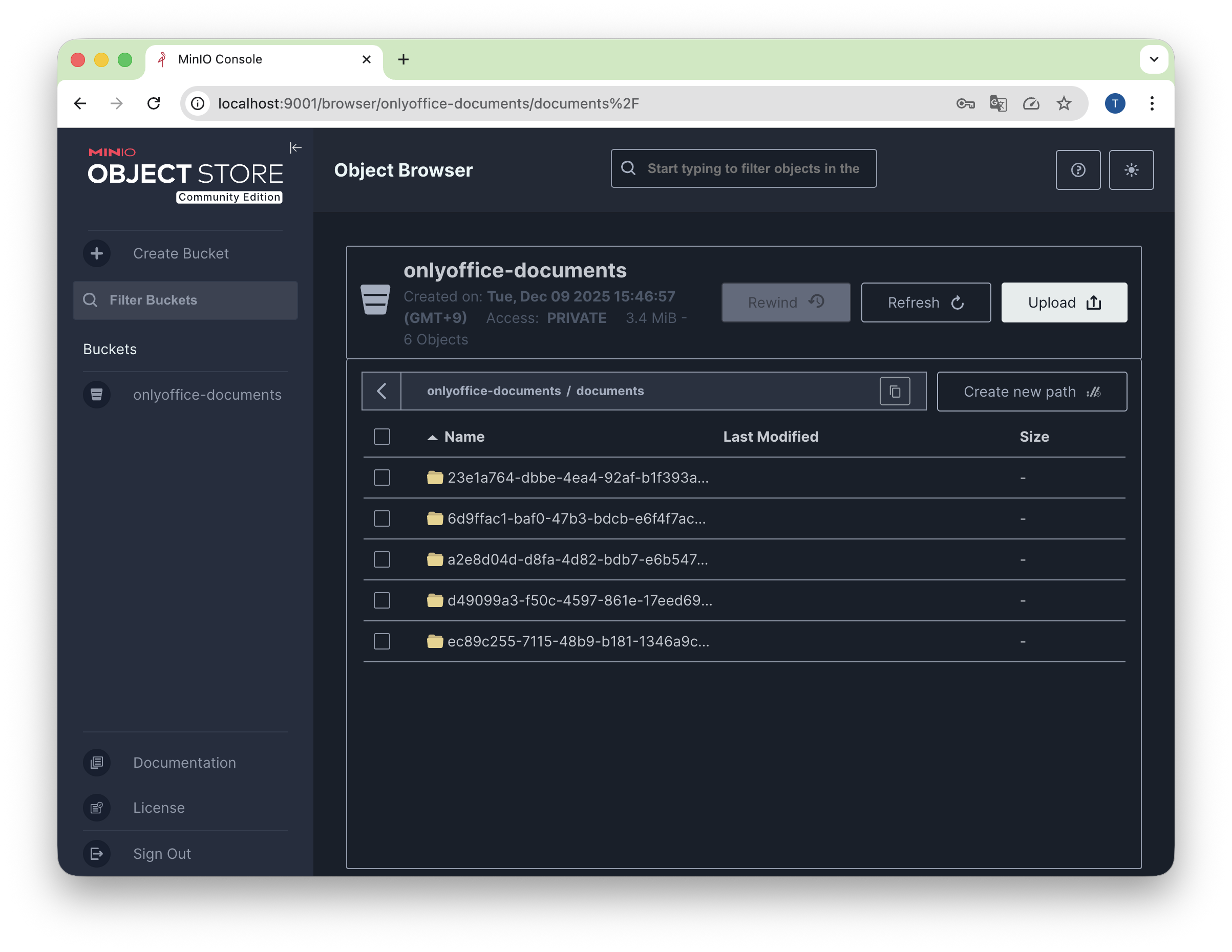
Storage Path 구조
minio-bucket/
└── documents/
    └── {fileKey}/           # UUID 폴더
        └── {fileName}       # 원본 파일명
⚠️ 왜 fileKey 폴더를 만들까?
같은
fileName을 가진 파일이 여러 개 있을 수 있다.
fileKey(UUID) 폴더로 격리해서 충돌을 방지한다.예시:
documents/550e8400-e29b-41d4-a716-446655440000/보고서_최종.docx
Part 3: DB + Storage 정합성을 위하여
문제 상황
Document 업로드 시 두 가지 작업이 이어진다.
1. DB에 Document 엔티티 저장
2. MinIO에 파일 업로드
만약 파일 업로드 중 오류가 발생하면 데이터 정합성이 깨질 수 있다:
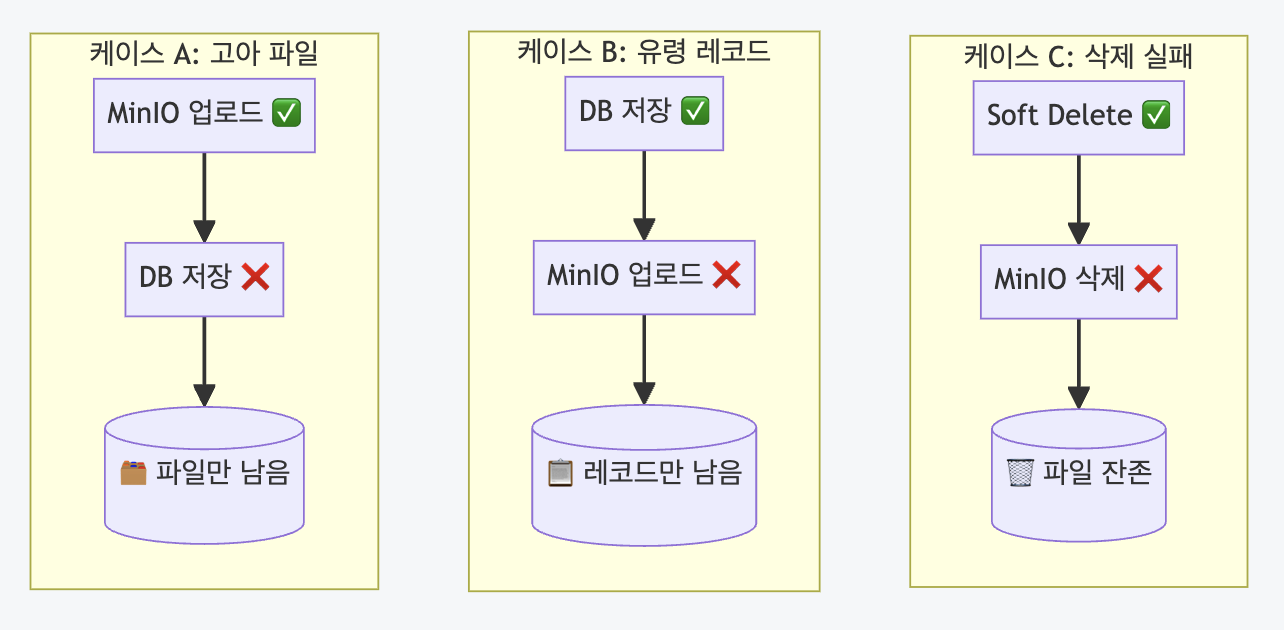
🚨 실패 시나리오: 분산 시스템에서 발생할 수 있는 케이스 3종
- 케이스 A: MinIO 업로드 성공 → DB 저장 실패 → 파일만 남음(고아 파일)
- 케이스 B: DB 저장 성공 → MinIO 업로드 실패 → "문서가 생겼다가 안 열림"
- 케이스 C: Soft Delete 성공 → MinIO 삭제 실패 → "삭제된 줄 알았는데 파일이 남아있음"
⚠️ 용어 참고: 엄밀히 Saga는 마이크로서비스 간 분산 트랜잭션 관리를 의미한다. 실제 필자가 ONLYOFFICE Integration Server 구축했을땐 기존의 파일 핸들링 서버가 별도로 존재해서 여기서도 비슷하게 해볼까 했는데..
지금 방식은 Orchestration Saga 패턴 의 단일 서비스 구현이다.
- DB 저장(Step 1) → MinIO 업로드(Step 2)
- Step 2 실패 시 MinIO cleanup(보상) +
@Transactional이 DB 롤백Saga의 핵심 개념(단계별 실행 + 보상 트랜잭션)은 외부 API 연동에도 적용할 수 있다.
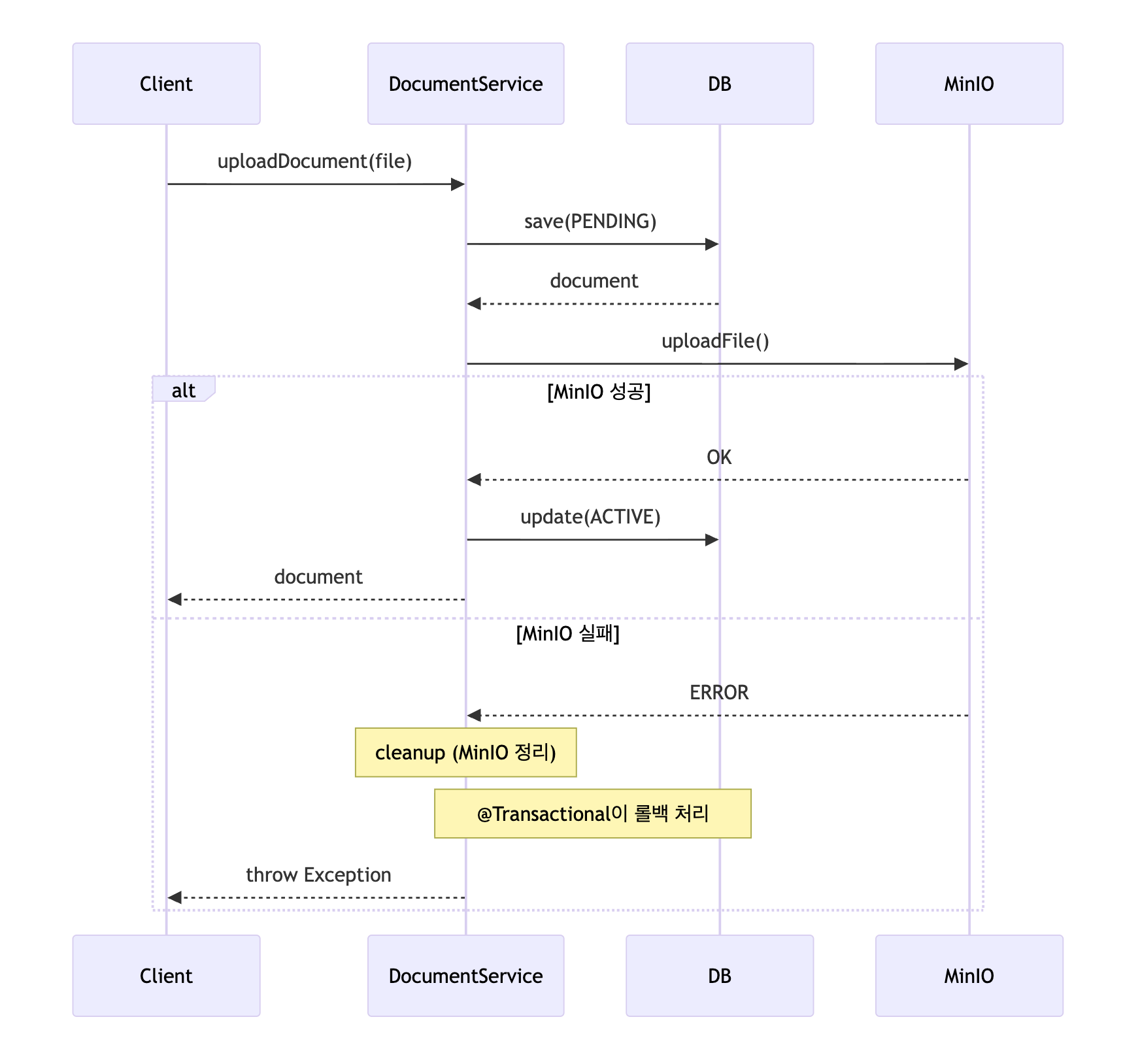
해결 방법: 실패 시 정리(Cleanup) 로직
핵심 아이디어는 단순하다.
외부 시스템 호출이 실패하면, 이전에 성공한 작업을 직접 되돌린다.
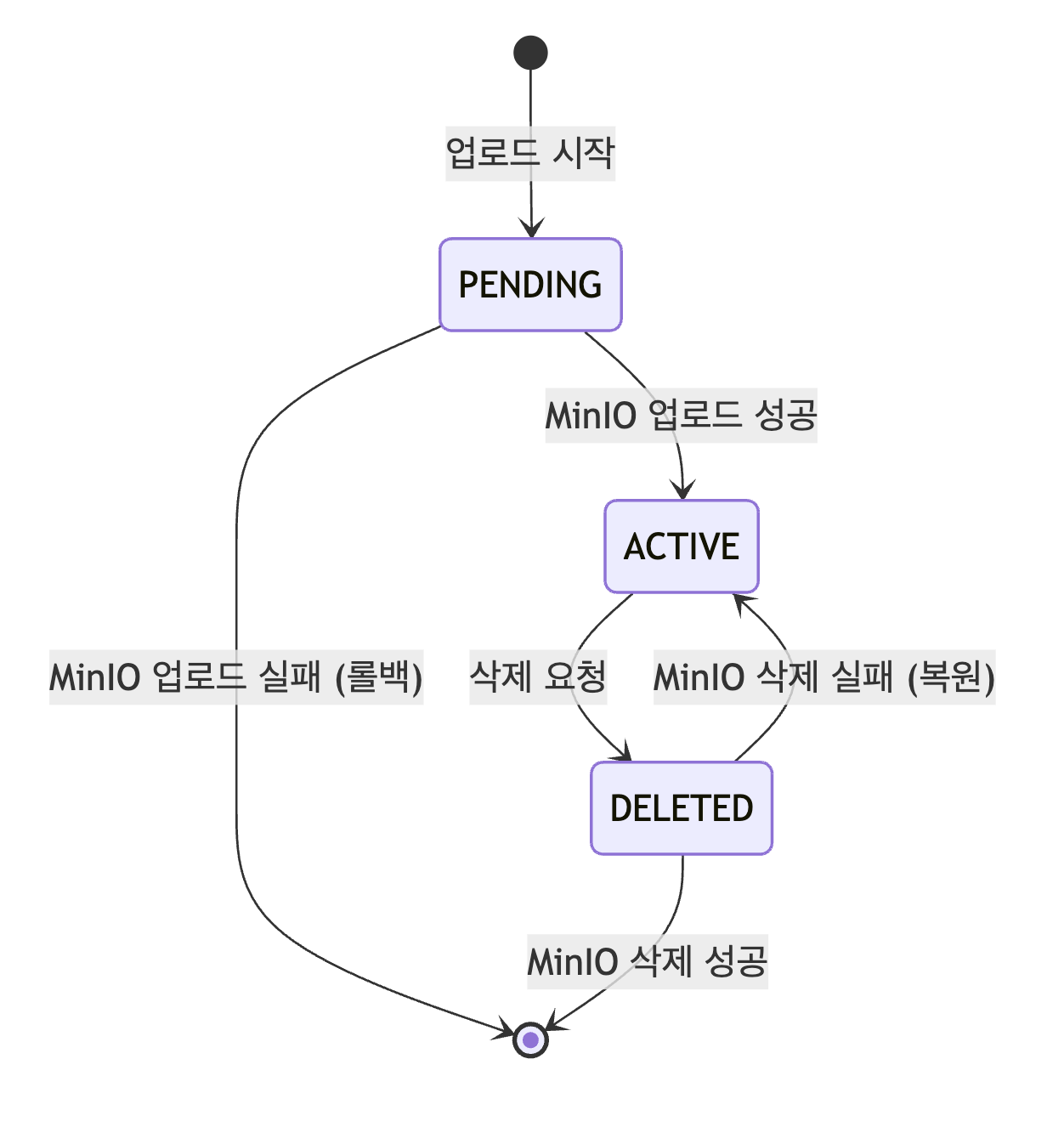
1. DB 저장 (PENDING 상태)
2. MinIO 업로드 시도
   - 성공 → DB 상태를 ACTIVE로 변경
   - 실패 → 업로드된 파일을 MinIO에서 삭제 + 예외 발생 → @Transactional이 DB 롤백
💡 PENDING 상태의 의미
사실 여기서는, 단일
@Transactional내에서 MinIO 실패 시 전체 롤백되므로, PENDING 상태는 사실상 커밋되지 않는다.
그럼에도 PENDING status를 두는 이유는,
1. 방어적 프로그래밍: 시스템 crash 시 불완전한 업로드 추적 가능
2. 미래 확장성: 비동기 업로드, 청크 업로드 등으로 변경 시 유용
3. 명시적 상태: 업로드 진행 중 을 코드에서 명확히 표현
+ 스터디 프로젝트니까!
왜 DB First인가? (vs MinIO First)
순서를 바꿔서 MinIO 업로드 → DB 저장 순서로 할 수도 있다. 두 방식을 비교해보자:
| 항목 | DB First (현재) | MinIO First |
|---|---|---|
| 순서 | DB(PENDING) → MinIO → DB(ACTIVE) | MinIO → DB |
| Step 1 실패 | 롤백 자동 (아무것도 없음) | 롤백 자동 (아무것도 없음) |
| Step 2 실패 | @Transactional이 DB 롤백 | MinIO cleanup 필요 |
| @Transactional 활용 | ✅ PENDING 레코드 롤백 | ❌ 롤백할 DB 작업 없음 |
| 고아 리소스 추적 | PENDING 상태로 조회 가능 | MinIO에서 직접 찾아야 함 |
DB First를 선택한 이유:
- @Transactional 활용: 실제로 롤백할 대상(PENDING 레코드)이 있음
- Observability: PENDING 상태로 "진행 중/실패" 업로드 추적 가능
- 장애 복구: 시스템 크래시 후
SELECT * FROM documents WHERE status = 'PENDING'으로 문제 파악 - Cleanup 단순화: MinIO 부분 업로드만 정리하면 됨
💡 핵심: MinIO First는 DB 실패 시 고아 파일이 MinIO에 남아도 추적 불가 → 별도 배치 작업 등 필요
DocumentService.java (업로드 + Saga)
@Service
@Transactional
public class DocumentService {

    public Document uploadDocument(MultipartFile file, String createdBy) {
        // 1. 파일 검증
        fileSecurityService.validateFile(file);

        String originalFilename = file.getOriginalFilename();
        String sanitizedFilename = fileSecurityService.sanitizeFilename(originalFilename);
        String fileKey = KeyUtils.generateFileKey();
        String storagePath = buildStoragePath(fileKey, sanitizedFilename);

        // 2. DB에 PENDING 상태로 먼저 저장
        Document document = Document.builder()
                .fileKey(fileKey)
                .storagePath(storagePath)
                .status(DocumentStatus.PENDING)  // ⭐ 아직 완료 아님
                .build();
        document = documentRepository.save(document);

        boolean storageUploaded = false;
        try {
            // 3. MinIO 업로드
            storageService.uploadFile(file, storagePath);
            storageUploaded = true;

            // 4. 성공 시 ACTIVE로 변경
            document.setStatus(DocumentStatus.ACTIVE);
            return documentRepository.save(document);

        } catch (Exception e) {
            // 5. 실패 시 cleanup + 롤백
            handleUploadFailure(document, storageUploaded);
            throw new DocumentUploadException("Upload failed", e);
        }
    }

    private void handleUploadFailure(Document document, boolean storageUploaded) {
        // MinIO에 업로드됐으면 삭제 (cleanup)
        if (storageUploaded) {
            try {
                storageService.deleteFile(document.getStoragePath());
            } catch (Exception cleanupException) {
                log.warn("Failed to clean up storage", cleanupException);
            }
        }
        // 예외가 발생하면 @Transactional이 DB를 롤백
    }
}
흐름:
DocumentService.java (삭제 + Saga)
삭제도 순서를 고려하는 것이 좋다. DB 먼저 삭제하면 MinIO 실패 시 복구가 어렵다.
@Transactional
public void deleteDocument(Long id) {
    Document document = documentRepository.findWithLockById(id)
            .orElseThrow(() -> new DocumentNotFoundException(id));

    String storagePath = document.getStoragePath();

    // 1. DB에서 soft delete (상태 변경 + deletedAt 설정)
    document.setStatus(DocumentStatus.DELETED);
    document.setDeletedAt(LocalDateTime.now()); // 추후 리팩토링 예정
    documentRepository.save(document);

    try {
        // 2. MinIO에서 파일 삭제
        storageService.deleteFile(storagePath);

    } catch (Exception e) {
        // 예외 발생 시 @Transactional이 롤백 처리
        log.error("Failed to delete file from storage: {}", storagePath, e);
        throw new DocumentDeleteException("Delete failed", e);
    }
}
문서 상태 다이어그램
Part 4: 콜백 동시성 제어
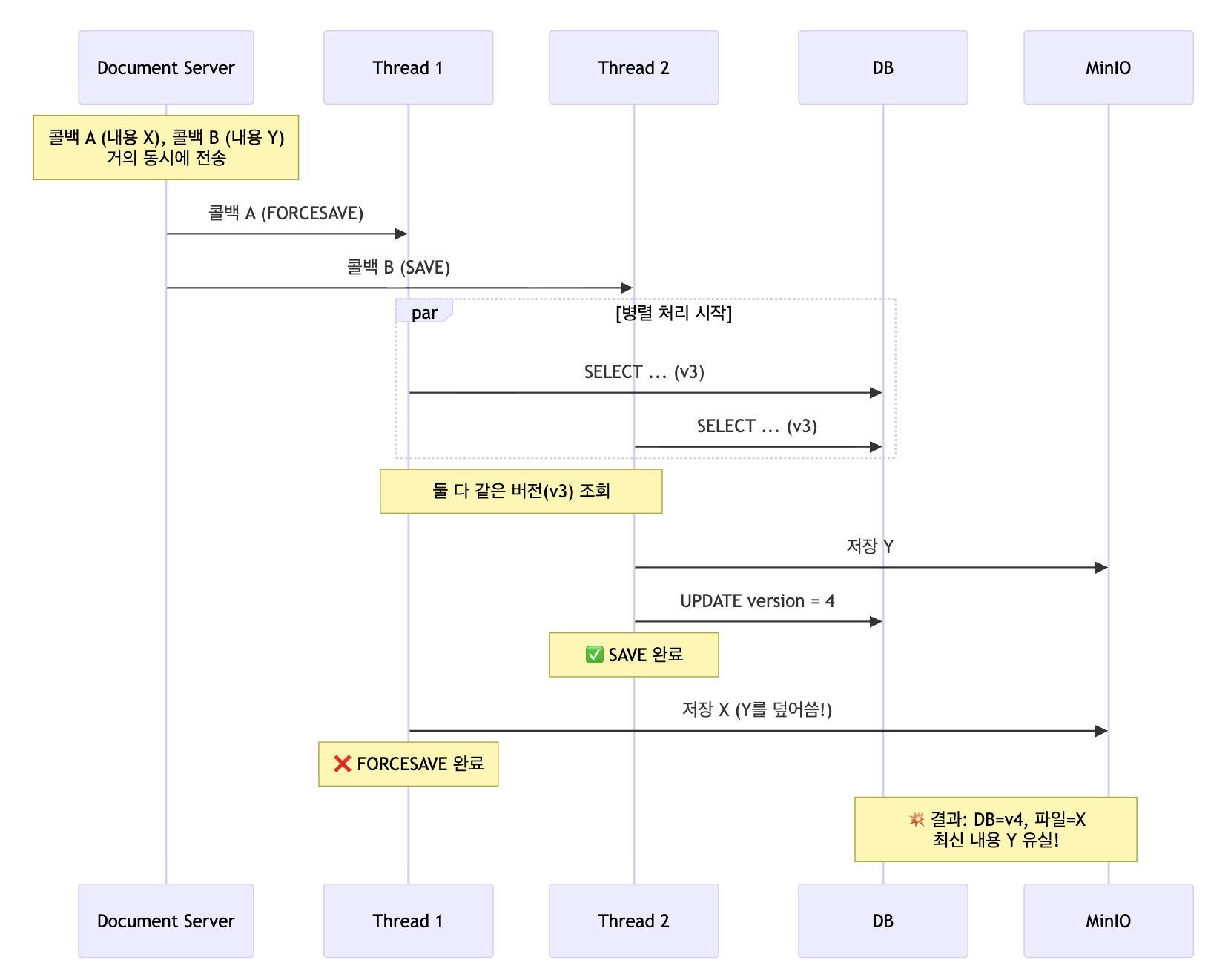
문제: 같은 문서에 콜백이 동시에 오면?
ONLYOFFICE는 편집 종료, 자동 저장, 재시도 등으로 같은 문서에 여러 콜백이 동시에 도착 할 수 있다.
해결: 2단계 방어
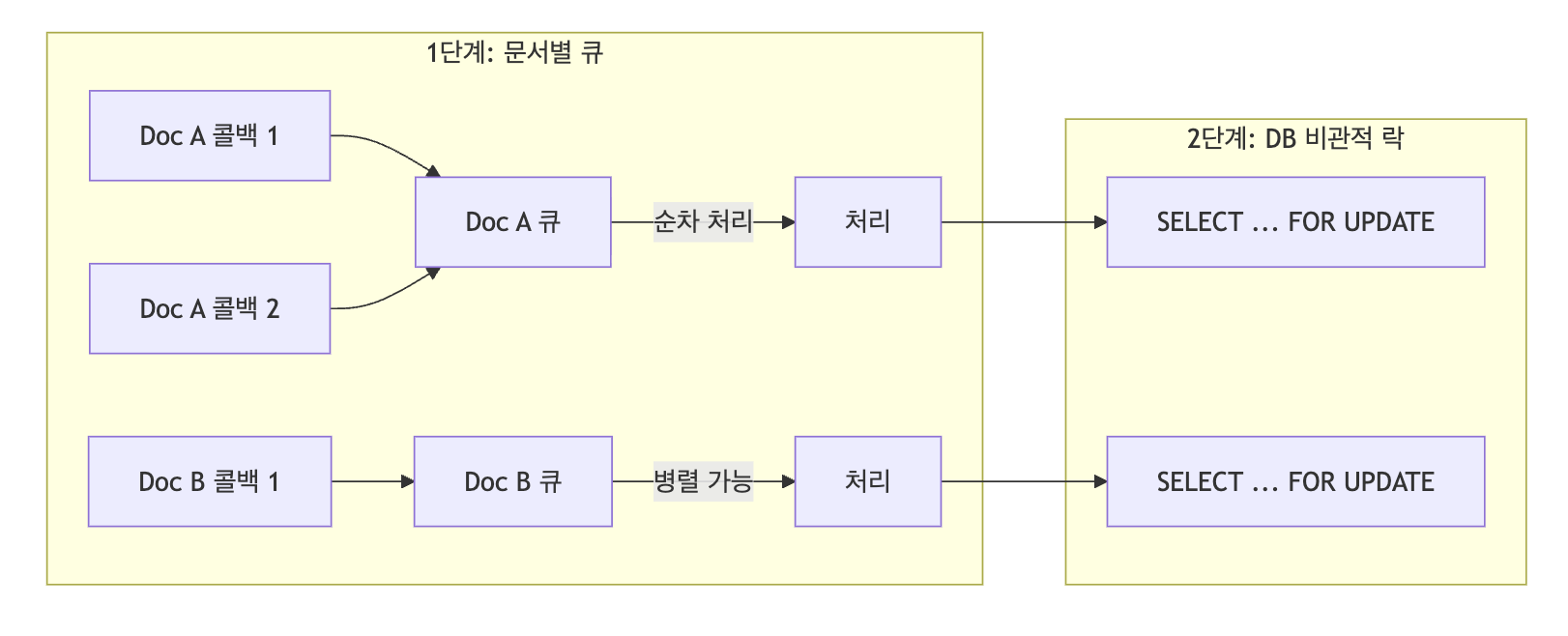
| 단계 | 역할 | 효과 |
|---|---|---|
| 문서별 큐 | 같은 fileKey 콜백을 순차 처리 | 순서 보장 |
| 비관적 락 | DB 갱신 구간 직렬화 | 원자성 보장 |
핵심 구현
⚠️ 주의: 데모 프로젝트 편의상 단일 인스턴스 환경을 가정했다.
1. 문서별 SingleThreadExecutor
// 핵심 아이디어: fileKey별로 싱글 스레드 executor 할당
ConcurrentHashMap<String, ExecutorService> executors = new ConcurrentHashMap<>();

public <T> T submitAndWait(String fileKey, Callable<T> task) {
    ExecutorService exec = executors.computeIfAbsent(fileKey,
        k -> Executors.newSingleThreadExecutor());
    return exec.submit(task).get(60, TimeUnit.SECONDS);
}
2. DB 비관적 락
@Lock(LockModeType.PESSIMISTIC_WRITE)
@QueryHints(@QueryHint(name = "jakarta.persistence.lock.timeout", value = "3000"))
Optional<Document> findWithLockByFileKey(String fileKey);
락 타임아웃 시 HTTP 5xx 반환
락 획득 실패 시 5xx으로 응답해야 ONLYOFFICE가 재시도 한다.
// CallbackController.java
@PostMapping("/callback")
public ResponseEntity<Map<String, Object>> callback(...) {
    try {
        // SDK로 콜백 처리
        callbackService.processCallback(callback, fileKey);
        return ResponseEntity.ok(Map.of("error", 0));

    } catch (LockTimeoutException | PessimisticLockException e) {
        // ⭐ 503 반환 → ONLYOFFICE가 재시도
        log.warn("Lock timeout, ONLYOFFICE should retry: {}", e.getMessage());
        return ResponseEntity.status(HttpStatus.SERVICE_UNAVAILABLE)
                .body(Map.of("error", 1, "message", "Document is locked"));
    } catch (Exception e) {
        // 그 외 오류는 200 + error:1 (재시도 안 함)
        return ResponseEntity.ok(Map.of("error", 1));
    }
}
📚 공식 문서: ONLYOFFICE Document Server의
callbackBackoffOptions.httpStatus기본 설정이"429,500-599"로 되어 있어, 이 범위의 HTTP 상태 코드만 재시도 대상이다.
응답 ONLYOFFICE 동작 200 + {"error": 0}완료 처리 200 + {"error": 1}영구 실패 (재시도 안 함) 503재시도함 ✅
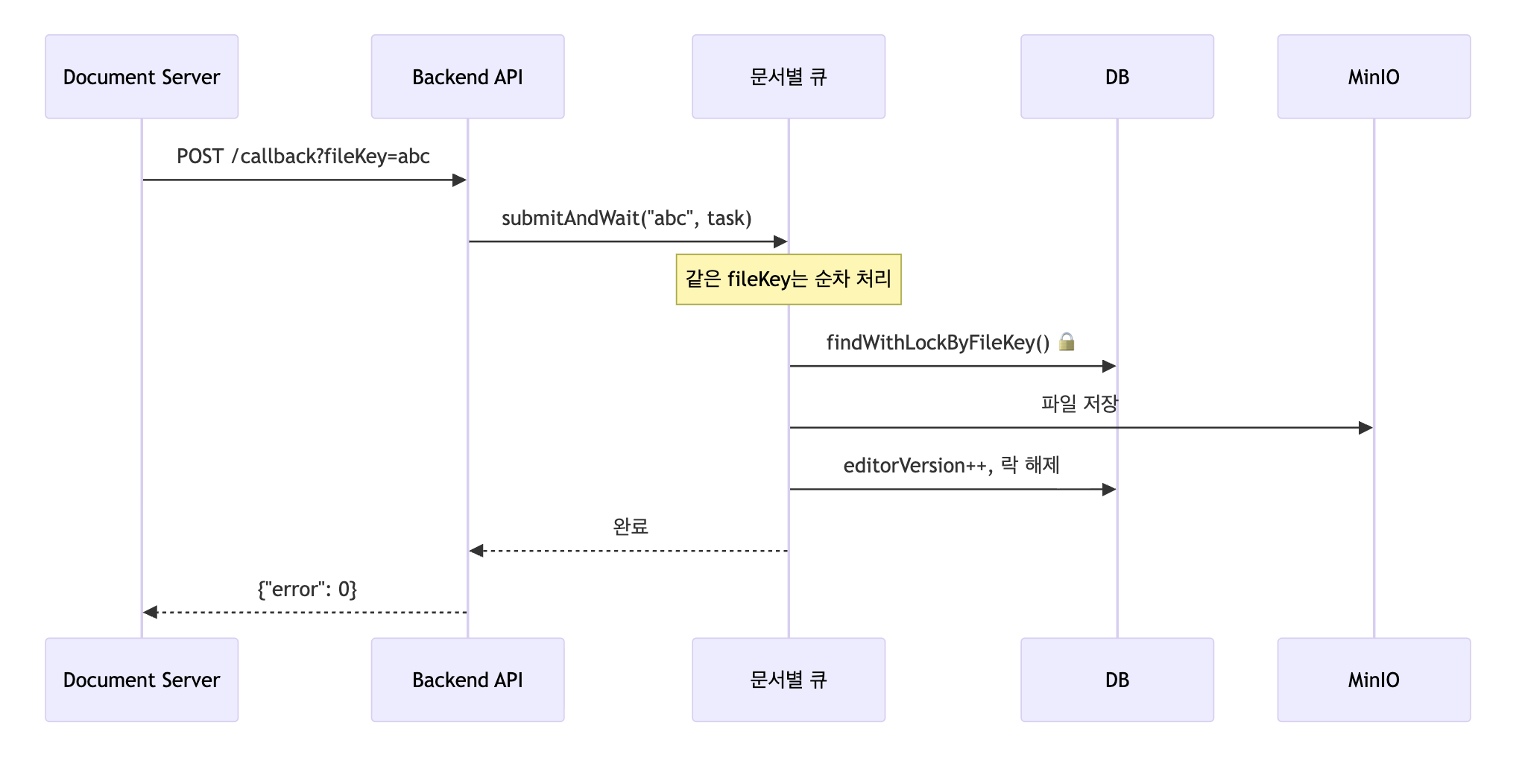
콜백 처리 전체 흐름
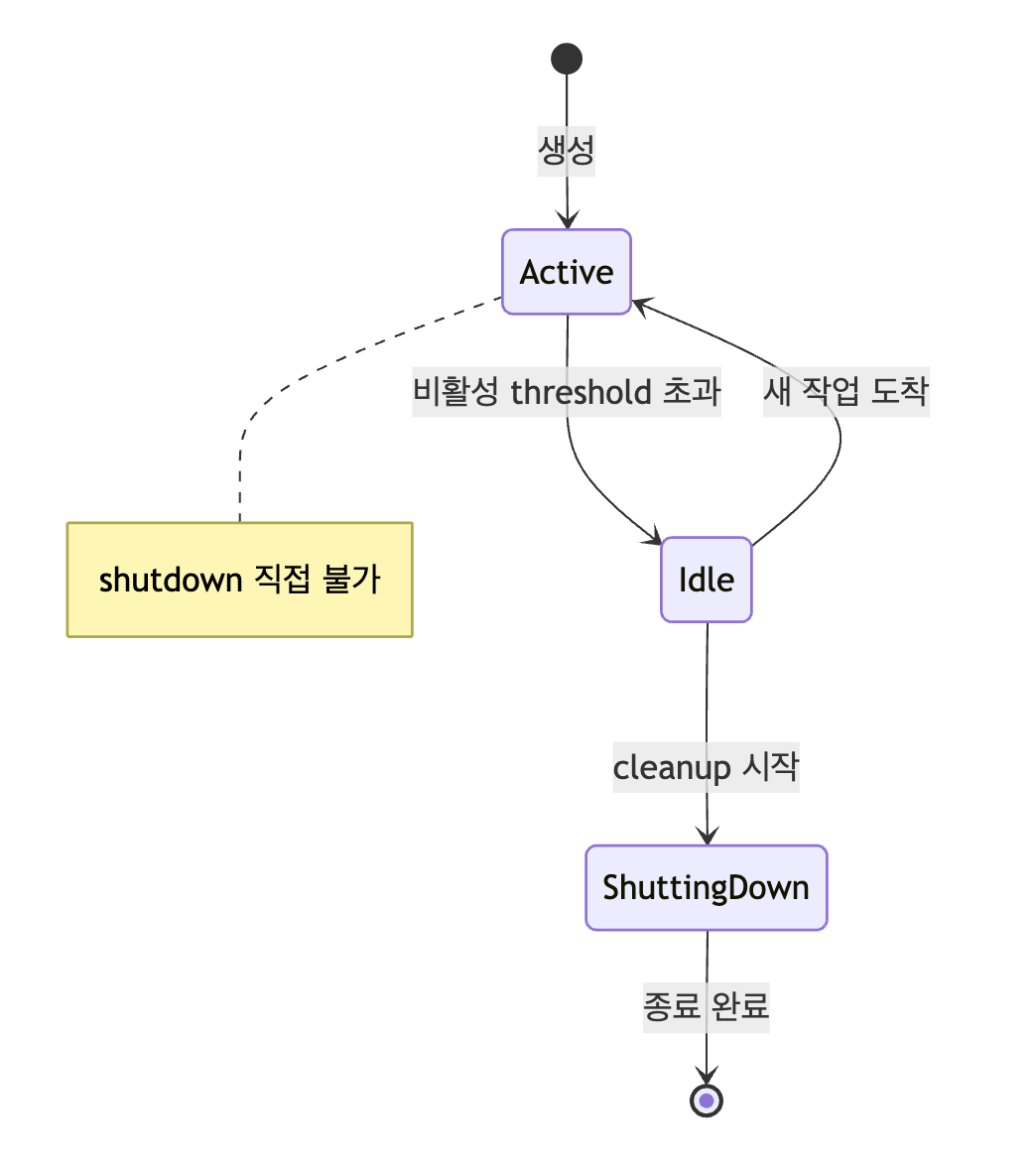
[심화] CAS 기반 상태 머신
위의 간단한 구현으로 충분하지만, executor cleanup 시 race condition 을 근본적으로 방지하려면
Java 21의 Sealed Interface + CAS 기반 상태 머신을 사용할 수 있다.
💡 핵심: Active 상태에서는 shutdown 불가 → 작업 유실 원천 차단
Javasealed interface ExecutorState permits ExecutorState.Active, ExecutorState.Idle, ExecutorState.ShuttingDown { record Active(long lastAccessTimeMs, ExecutorService executor) implements ExecutorState {} record Idle(long lastAccessTimeMs, ExecutorService executor) implements ExecutorState {} record ShuttingDown(long lastAccessTimeMs, ExecutorService executor) implements ExecutorState {} }실제 onlyoffice-demo Github 엔 이 방식으로 리팩토링 해봤는데.. 분량 조절을 위해 velog에는 자세한 설명은 생략한다. 별도의 글로 따로 쓸지도?
Part 5: StreamingResponseBody로 Resource Leak 해결
문제: 기존의 InputStreamResource
기존 파일 다운로드 API도 문제가 있었다.
// 위험한 패턴 ❌
@GetMapping("/files/{fileKey}")
public ResponseEntity<Resource> downloadFile(@PathVariable String fileKey) {
    Document doc = documentService.findByFileKey(fileKey).orElseThrow();
    InputStream stream = storageService.downloadFile(doc.getStoragePath());
    Resource resource = new InputStreamResource(stream);  // 스트림 누수 가능!

    return ResponseEntity.ok()
            .contentType(MediaType.APPLICATION_OCTET_STREAM)
            .body(resource);
}
왜 위험한가?
| 시나리오 | InputStreamResource | 결과 |
|---|---|---|
| 정상 전송 완료 | HttpMessageConverter가 읽음 | 명시적 close() 보장 안 됨 |
| 클라이언트 연결 끊김 | 닫히지 않음 | 리소스 누수 |
| 네트워크 타임아웃 | 닫히지 않음 | 리소스 누수 |
MinIO 스트림은 HTTP 연결이다. 제대로 닫아주지 않으면 커넥션 풀이 고갈 될 수 있다.
해결책: StreamingResponseBody + try-with-resources
💡 StreamingResponseBody란?
OutputStream을 직접 받아 쓰는 함수형 인터페이스. 별도 스레드에서 비동기 실행되며, 대용량 파일을 메모리에 로드하지 않고 스트리밍할 수 있다.
@RestController
public class FileController {

    private static final int BUFFER_SIZE = 65536; // 64KB 버퍼

    @GetMapping("/files/{fileKey}")
    public ResponseEntity<StreamingResponseBody> downloadFile(
            @PathVariable @Pattern(regexp = KeyUtils.UUID_REGEX) String fileKey) {

        Document doc = documentService.findByFileKey(fileKey).orElseThrow();
        String storagePath = doc.getStoragePath();  // ⭐ MinIO Path

        // ⭐ StreamingResponseBody: 비동기 스트리밍
        StreamingResponseBody streamingBody = outputStream -> {
            // ⭐ try-with-resources로 일반적인 시나리오에서 스트림 닫힘 보장
            try (InputStream input = storageService.downloadFile(storagePath)) {
                byte[] buffer = new byte[BUFFER_SIZE];
                int bytesRead;
                while ((bytesRead = input.read(buffer)) != -1) {
                    outputStream.write(buffer, 0, bytesRead);
                }
                outputStream.flush();
            } catch (IOException e) {
                // IOException 처리: 클라이언트 끊김(Broken pipe) vs 서버 오류 구분 로깅 등
            }
        };

        return ResponseEntity.ok()
                .header(HttpHeaders.CONTENT_DISPOSITION, /* attachment; filename=... */)
                .contentType(MediaType.APPLICATION_OCTET_STREAM)
                .body(streamingBody);
    }
}
간단 포인트:
| 항목 | 설명 |
|---|---|
| StreamingResponseBody | 스트림 제어권을 개발자가 가짐 → try-with-resources 적용 가능, 커스텀 에러 핸들링 |
| try-with-resources | 정상 완료, 클라이언트 끊김, 타임아웃 모든 시나리오에서 스트림 닫힘 보장 |
AsyncConfig: 스트리밍 전용 스레드 풀
StreamingResponseBody 는 비동기 로 실행된다. 전용 스레드 풀이 필요하다.
@Configuration
public class AsyncConfig implements WebMvcConfigurer {

    @Value("${streaming.async-timeout-ms:300000}")
    private long asyncTimeoutMs;

    @Override
    public void configureAsyncSupport(AsyncSupportConfigurer configurer) {
        configurer.setTaskExecutor(streamingTaskExecutor());
        configurer.setDefaultTimeout(asyncTimeoutMs);
    }

    @Bean
    public AsyncTaskExecutor streamingTaskExecutor() {
        ThreadPoolTaskExecutor executor = new ThreadPoolTaskExecutor();
        executor.setCorePoolSize(4);           // 기본 동시 다운로드
        executor.setMaxPoolSize(10);           // 부하 시 확장
        executor.setQueueCapacity(50);         // 대기열
        executor.setThreadNamePrefix("streaming-");
        executor.setWaitForTasksToCompleteOnShutdown(true);  // ⭐ Graceful shutdown
        executor.setAwaitTerminationSeconds(30);
        executor.initialize();
        return executor;
    }
}
💡 참고:
streaming.async-timeout-ms를application.yml에서 설정 가능하게 했다.
대용량 파일 다운로드 시 5분 이상 필요할 수 있다.
비교표
| 항목 | 3편 | 4편 |
|---|---|---|
| Config 생성 | Map<String, Object> 직접 조립 |
SDK ConfigService 활용 |
| JWT 처리 | 직접 구현 | DefaultJwtManager 사용 |
| 파일 저장소 | 로컬 파일시스템 | MinIO (S3 호환) |
| 업로드 정합성 | 보장 안 됨 | Saga 패턴으로 보장 |
| 콜백 동시성 | 비관적 락만 | 문서별 큐 + 비관적 락 |
| 문서 타입 감지 | 확장자 수동 매핑 | SDK 포맷 DB 활용 |
| 파일 다운로드 | InputStreamResource |
StreamingResponseBody + try-with-resources |
정리
- SDK Manager 활용:
Default*Manager를 확장해 타입 안전한 Config 생성, SDK의 포맷 DB/타입 감지 기능 활용 - MinIO 적용: S3 호환 API로 추후 확장 대비,
spring-retry@Retryable로 네트워크 장애 자동 재시도 - Saga 패턴: PENDING → ACTIVE 상태 전환 + 실패 시 cleanup/롤백으로 DB/Storage 정합성 보장
- 콜백 큐: 문서별 싱글 스레드 Executor로 동시성 제어, idle 정리로 메모리 관리
- StreamingResponseBody: MinIO 스트림의 리소스 누수 방지, try-with-resources로 모든 시나리오에서 스트림 닫힘 보장
5편 예고
- Next.js: 현재 일반적인 React로 구현된 프론트엔드를
Next.jsApp Router 기반으로 전면 리팩토링 - Streaming SSR:
useSuspenseQuery+ React Suspense로 점진적 렌더링 - TanStack Query: 서버 상태 관리, 캐싱, prefetch 등
참고 자료
ONLYOFFICE: Java SDK GitHub | 공식 문서
MinIO: S3 api
GitHub: onlyoffice-demo