Jotai - atoms in atom
목차
들어가며
이번 포스트는 Jotai - atom 구조화 에서 이어지는 내용입니다.
Jotai의 creator인 Daishi Kato의 egghead lesson 을 바탕으로 하고 있으며 전체 코드는 code sandbox 에서 확인하실 수 있습니다.
하나의 도형
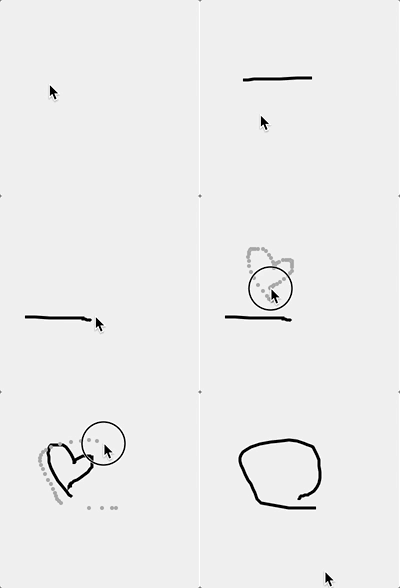
지난 포스트 에서 우리가 만든 결과물은 다음처럼 하나의 path만 표시가 되었다.
여러 개의 도형
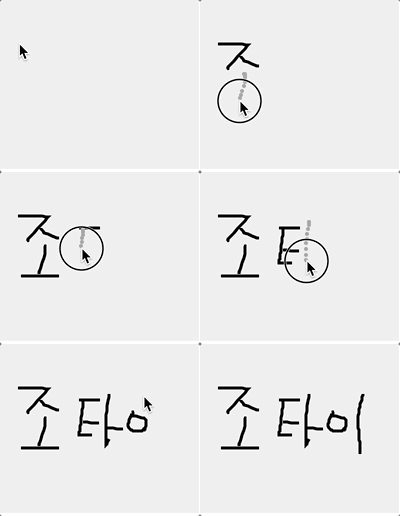
오늘 우리의 목표는 다중 경로를 나타내는 것이다. 그러기 위해서는 새로운 파일인 SvgShapes.tsx가 필요하다.
SvgShapes.tsx 작성
TSX
// SvgShapes.tsx
import { atom, useAtom } from "jotai";
import { Point, ShapeAtom } from "./types";

const shapeAtomsAtom = atom<ShapeAtom[]>([]);
shapeAtomsAtom은 atom의 배열을 값으로 가지는 atom으로 이름하여 atoms in atom 이다.
SvgShape.tsx 수정
다음으로 SvgShape.tsx를 수정해보자.
전역으로 정의된 atom 대신 props로 shapeAtom을 받아서 사용한다.
TSX
// SvgShape.tsx

...

export const SvgShape = ({
  shapeAtom
}: {
  shapeAtom: ShapeAtom;
}) => {
  const [shape] = useAtom(shapeAtom);
  return (
    <g>
      <path
        d={shape.path}
        fill="none"
        stroke="black"
        strokeWidth="3"
      />
    </g>
  );
};
addShapeAtom에서의 전역 atom을 사용하지 않고 대신 createShapeAtom 함수를 내보내서 다른 파일에서 사용할 수 있다.
TSX
// SvgShape.tsx
export const createShapeAtom = (
  points: readonly Point[]
) => atom({ path: pointsToPath(points) });

...
SvgShapes.tsx 수정
이제 다시 SvgShapes.tsx로 돌아가서 이를 가져와보자
TSX
// SvgShapes.tsx
import { createShapeAtom, SvgShape } from "./SvgShape";

const shapeAtomsAtom = atom<ShapeAtom[]>([]);

export const addShapeAtom = atom(
  null,
  (_get, set, update: readonly Point[]) => {
    const shapeAtom = createShapeAtom(update);
    set(shapeAtomsAtom, (prev) => [
      ...prev,
      shapeAtom
    ]);
  }
);
addShapeAtom은 새로운 shapeAtom을 만들고 이를 shapeAtomsAtom에 추가해준다.
TSX
// SvgShapes.tsx

...

export const SvgShapes = () => {
  const [shapeAtoms] = useAtom(shapeAtomsAtom);
  return (
    <g>
      {shapeAtoms.map((shapeAtom) => (
        <SvgShape
          key={\`${shapeAtom}\`}
          shapeAtom={shapeAtom}
        />
      ))}
    </g>
  );
};
SvgShapes는 shapeAtomsAtom의 shapeAtom 배열을 반복하는 새로운 컴포넌트다.
이제 기존의 SvgDots.tsx와 SvgRoot.tsx에서 새로 만든 컴포넌트를 가져다 쓰면 끝이다.
SvgDots.tsx 수정
TSX
// import { addShapeAtom } from "./SvgShape";
import { addShapeAtom } from "./SvgShapes";
SvgRoot.tsx 수정
TSX
// import { SvgShape } from "./SvgShape";
import { SvgShapes } from "./SvgShapes";
결과
jotai와 atoms in atom 방법을 사용하여 여러 개의 atom을 다루는 방식을 알아보았다.